The pages in the Actipro Wizard can be easily created to follow the Wizard 97 specification or completely customized to fit your needs. There are tons of options available to you when designing your pages, everything from titles and descriptions to enabling or disabling buttons.
The pages presented by the Wizard control can be explicitly defined or bound to a data collection, which allows it to be easily leveraged from MVVM applications.
There are three distinct page types, which include Exterior, Interior, and Blank. The Exterior and Interior types are based on the Wizard 97 specification and the Blank type allows for complete customization.
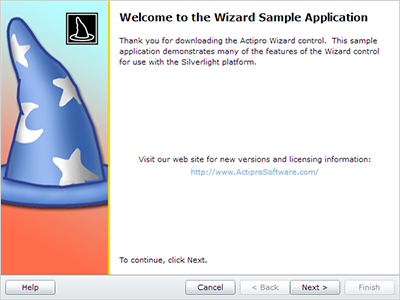
Exterior pages typically come at the beginning and end of the wizard, which are known as welcome pages and completion/finish pages, respectively. Welcome pages are used to convey the purpose of the wizard and completion/finish pages can be used to summarize the operation that was or is going to be performed.

Exterior pages have a watermark area that appears on the left side of the page, which can be used to help the end-user quickly recognize the wizard and the operation it performs. By default this area is filled with the system highlight color but can be customized to any sort of image or gradient background.
There is a large header label at the top of the content area, which displays the caption of the page. Another label is placed under the header and provides a brief description of the page.
Interior pages typically appear as the "inner" pages of the wizard and are used to collect information from the end-user. This information can include everything from contact information to file/folder paths. Since the pages can host any Silverlight content, there is no limit to what you can do.

Interior pages have a header area that stretches across the entire top of the page, which displays the page's caption and description. The header can be customized to display any sort of image or gradient background to give it more pizzazz.
Blank pages do not have any kind of header or watermark and simply display their content in the area given. This gives you full control over what is displayed and how.

Blank pages can be used to create slide shows, step-based training materials, quizes/exams, and much more.

Every wizard page has a unique caption, description, and title, each of which is designed for a certain purpose.

A page's caption is a small phrase that is typically displayed in a bold or large font as header text for the page. A brief description of the page can be included, which typically appears below the caption.
The Wizard control can automatically update the containing ChildWindow's title based on the selected page. The title of a Wizard page is not visible in the page by default, however it can be used to construct the window's title. There are several other options available for customizing the window's title, including custom formats.
The buttons at the bottom of the Wizard control are used by the end-user to navigate the pages. There are several options available to customize these buttons.
The Wizard control allows total control over the visibility and enabled states of the buttons, both at a global wizard level and at a page-specific override level.
Global settings made on the Wizard control are default settings for all contained pages. Individual pages can be configured to inherit the global settings or override one or all of the settings. The page-specific settings take effect while that particular page is selected.
All of these properties may be changed at run-time programmatically to update the user interface button states.
The Wizard control can optionally attempt to close the containing ChildWindow when the Finish or Cancel buttons are clicked. It can even set the dialog result of the ChildWindow, based on whether the Finish or Cancel button is clicked. This allows you to easily determine if the end-user completed the wizard or is trying to cancel it.