Sold separately from SyntaxEditor and its containing bundles
The .NET Languages Add-on, combined with the SyntaxEditor control, brings an enhanced C# and Visual Basic code editing experience to your end users.
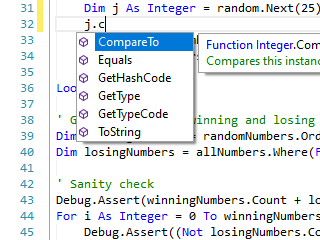
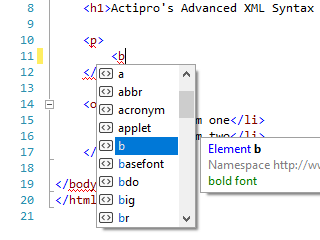
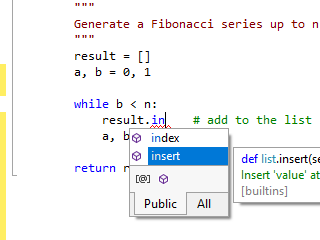
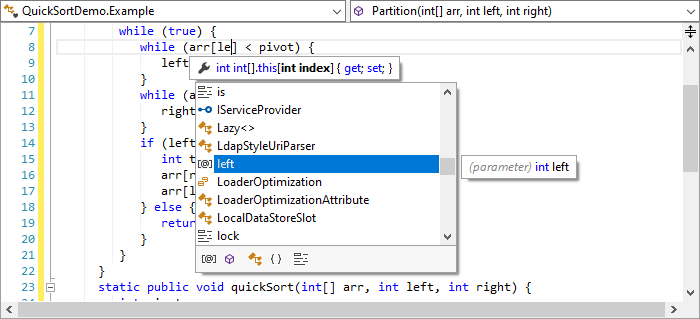
Automated completion lists and 'Ctrl+Space' auto-complete features are fully supported and available out-of-the-box. The context-sensitive completion data is populated with information from the reflection repository.

Automated parameter info tips show whenever typing an invocation, such as for a method call. The tips show detailed information about the invoked member along with details about the current argument being typed. In the case where the invoked member has multiple overloads, arrows show on the popup and allow toggling between all the available overloads.
Automated quick info tips show whenever the mouse is hovered over words such as identifiers. The quick info tips display detailed information about the related type, member, variable, etc. Similar to parameter info tips, all information is presented using rich text formatting.

If a code snippet shortcut is typed followed by a Tab keypress, the code snippet is inserted and activated.
Syntax highlighting is included for both C# and VB, which makes it easier to visually distinguish things like keywords, strings, and comments while editing.
When typing /// (C#) or ''' (VB) immediately before a type or member,
stub documentation comments will automatically be inserted.


As Enter is pressed within a documentation comment, /// (C#) or ''' (VB) are auto-inserted on the next line for continuation of the comment.
A context-sensitive completion list of tags is displayed whenever typing a new start tag within documentation comments.
When typing a > to close a start tag, the appropriate end tag is auto-inserted.
The C# and VB parsers are designed according to the latest official language specifications.
The language parsers output an AST (abstract syntax tree) for each document parsed. This tree consists of a node for every code construct in the document (type declaration, statement, expression, etc.). Over 100 distinct AST node classes are defined and used by both the C#/VB parsers so that regardless of which language is in use, the same AST format is returned in the parse results.
While the parser executes, it keeps track of any syntax errors that are found and reports these back in the parse data results. SyntaxEditor then renders squiggle lines under each error and provides quick info tips with information describing the error.

Automatic code outlining is performed based on the AST data generated by the parser. This means that only blocks such as type and member declarations are rendered as outlining nodes.

#Region ... #EndRegion blocks can be collapsed.
The add-on manages reflection data for both .NET assemblies as well as source code files. All of this data, which consists of everything from namespaces down to member parameters, is queried and used by features like the resolver, thus helping to populate automated IntelliPrompt.
Smart indenting occurs when the Enter key is pressed and determines how far to indent text on the next line
based on the contents of the code that surrounds the caret.
For instance, characters such as {, }, or : have an effect on the smart indent level in C#.
Code block selection provides a way to expand the selection to include the containing code block. When the selection is first expanded, it may select the containing statement. By expanding it again, it may select the containing method. By expanding it again, it may select the containing class. And so on up the compilation unit.
By contracting the selection, it goes back and selects the previously selected block. Contracting can occur recursively to go back to the original selection.
Built-in functionality can be called from menus/toolbars to comment and uncomment code lines.
SyntaxEditor's code fragments feature allows an end user to edit a small fragment of code, but for parsing purposes, the document's text is pre-pended with header text and post-pended with footer text. When combined with the .NET Languages Add-on, this can be a very powerful feature since enables scenarios for the end user to edit method bodies, or a single statement/expression. The best part is that automated IntelliPrompt and syntax error reporting still continue to work as expected!
SyntaxEditor has an extensible text statistics feature. The .NET Languages Add-on's languages have implemented customized statistics that related to C# and VB code, such as comment coverage.

The ASTs generated by the language parsers can be displayed as a document outline in a TreeView control.
A type/member drop-down list control that can be bound to a SyntaxEditor instance is included with the add-on. Its left drop-down shows the types that are available in the current document's compilation unit. Its right drop-down shows the members within the current type that are available.

The drop-downs update to reflect data about the compilation unit currently being edited. As the SyntaxEditor caret moves through a document, the drop-down list selections change. If the end user selects a type or member from one of the drop-down lists, the SyntaxEditor caret jumps to that position in the document.