WinForms Controls v25.1.1 Released

by Avatar Bill Henning (Actipro)
Thursday, January 22, 2026 at 9:57pm

This version implements a huge update in the SyntaxEditor Python Languages Add-on to support Python 3.11 syntax and makes other improvements to the Python and .NET Languages Add-ons.

See the related announcement post for the detailed list of enhancements and updates.

Download Buy Now

Here’s a look at some of the new features.

SyntaxEditor Python Language Add-on

Python v3.11 Syntax Support

Pattern matching example

The Python Language Add-on's parser previously only supported Python v3.9 syntax, which will be end of life later this year. The updates in this version added all the syntax updates in v3.10 (like pattern matching) and v3.11. More updates are planned to further increase the supported Python version.

Source Location Display

Past versions have always displayed the source module path on IntelliPrompt popups. In some cases, customers didn't wish for this information to be available to end users. A new option can prevent its display.

Field and Variable Docstrings

Docstrings for fields and variables will now be displayed in IntelliPrompt popups.

WPF Controls v25.1.2 Released

by Avatar Bill Henning (Actipro)
Thursday, November 6, 2025 at 4:28pm

This version makes many small feature enhancements and quality of life improvements in the WPF Controls.

See the related announcement post for the detailed list of enhancements and updates.

Download Buy Now

Avalonia Controls v25.2.1 Released

by Avatar Bill Henning (Actipro)
Monday, August 25, 2025 at 6:31pm

A new Avalonia Controls release is now available that provides for complete control over the color palette used by the Actipro theme generator.

See the related announcement post for the detailed list of enhancements and updates.

Download Buy Now

Here’s a look at some of the new features.

Themes

Color Palette Customization

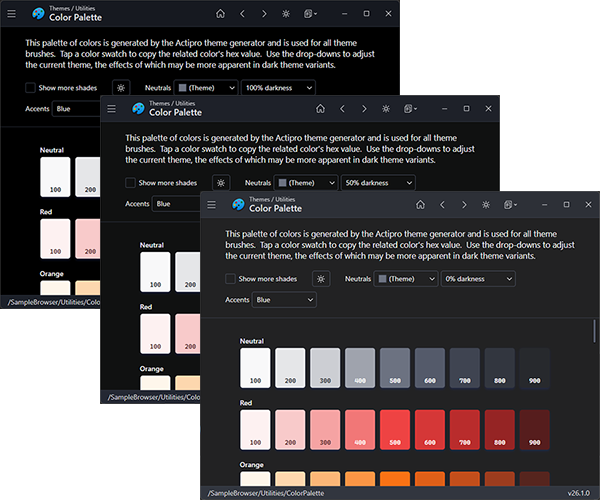
The factory that creates a color palette used by the Actipro theme generator can now be customized and assigned. A default factory implementation is included that allows for easy adjustment of the color ramps generated by the color palette. You can easily adjust all palette colors and tint a theme to any color you prefer. This feature goes a long way towards creating a unique appearance for your applications.

Several neutral and accent color variations that demonstrate theme tinting

Color Palette Utility

The Color Palette utility, part of our samples app, visually displays the entire color palette for the current theme. It now has a drop-down for selecting between several neutral midtone colors. Neutrals are important because they make up 80-90% of a theme and effectively tint a theme. The tinting effect is more apparent in dark theme variants. Another new drop-down lets you select the hue for accent colors, such as those used for selected item backgrounds.

Docking / MDI

Semi-Transparent Dragged Windows

A floating tool window being dragged, with partial transparency showing the content below

A new option allows floating windows to appear semi-transparent while dragged. This makes it easier to see what drop targets are behind the dragged window.

WPF Controls v25.1.1 Released

by Avatar Bill Henning (Actipro)
Thursday, July 31, 2025 at 5:23pm

This version implements a huge update in the Python Languages Add-on to support Python 3.11 syntax, makes various improvements throughout Bars and other products, adds auto-hide tool window middle-click close, and more.

See the related announcement post for the detailed list of enhancements and updates.

Download Buy Now

Here’s a look at some of the new features.

SyntaxEditor Python Language Add-on

Python v3.11 Syntax Support

Pattern matching example

The Python Language Add-on's parser previously only supported Python v3.9 syntax, which will be end of life later this year.  The updates in this version added all the syntax updates in v3.10 (like pattern matching) and v3.11.  More updates are planned for the future to further increase the supported Python version.

Source Location Display

Paste versions have always displayed the source module path on IntelliPrompt popups.  In some cases, customers didn't wish for this information to be available to end users.  A new option can prevent its display.

Field and Variable Docstrings

Docstrings for fields and variables will now display in IntelliPrompt popups.

Docking/MDI

Auto-Hide Tab Middle Click Close

Middle-clicking on an auto-hidden tool window tab can now close the tool window.

WinForms Controls v25.1.0 Released

by Avatar Bill Henning (Actipro)
Tuesday, June 10, 2025 at 6:52pm

This version adds new SyntaxEditor features, implements a huge update in the .NET Languages Add-on to support the latest C# 13 syntax, makes large improvements in C# interpolated string editing, and much more.

See the related announcement post for the detailed list of enhancements and updates.

Download Buy Now

Here’s a look at some of the new features.

SyntaxEditor

Intra-Text Adornment Location

Elapsed time adornment shown at the end of a line

Intra-text adornments can now optionally appear after the tagged text range instead of before. This allows for features such as AI suggestions or contextual information to appear past the last character in a line.

Outlining Margin Modernization

Outlining margin glyph updates

The rendering of the outlining margin has been modernized and now matches the latest Visual Studio code editor appearance.

SyntaxEditor .NET Languages Add-on

C# 13 Syntax Support

Parameters showing in IntelliPrompt from C# primary constructors

The .NET Languages Add-on’s C# parser previously only supported C# 9 syntax. The updates in this version now support all C# features up to and including C# 13.

C# Interpolated String Expressions

IntelliPrompt working in interpolated string expressions

The .NET Languages Add-on’s C# syntax language now syntax highlights interpolated string expressions. It also fully supports IntelliPrompt features within the expressions, making interpolated string editing much better.

Miscellaneous

.NET Requirements

All assemblies now have a target for .NET 8. Prior .NET Core 3.1 targets were updated to .NET 6 instead, which can be used by those not yet moving to .NET 8.