 Bill Henning (Actipro)
Actipro WPF Controls v26.1 modernized the entire product suite with official Visual Studio 2026 and .NET 10 support, comprehensive nullable reference type annotations, and a new shared Core assembly. Editors gained a new RangeSlider, DecimalEditBox, and DecimalPicker, while SyntaxEditor received significant document model enhancements that preserved original line terminators and improved text storage performance and memory usage. The release also expanded menu customization, strengthened Bars and Docking/MDI workflows, modernized window chrome, and delivered numerous theme, DPI, accessibility, and usability refinements.
See the related announcement post for the detailed list of enhancements and updates.
Here’s a look at some of the new features.
Editors
RangeSlider
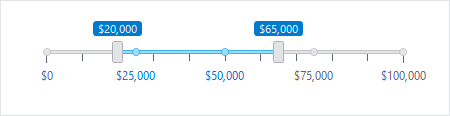
The new RangeSlider control provided a convenient way for users to select a range between two values.
Decimal Editors and Input Filtering
New DecimalEditBox and DecimalPicker controls provided native editing and selection for Decimal values, including integration support for DataGrid and Grids.
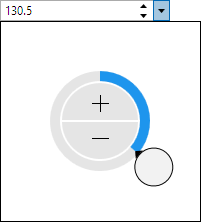
Most edit boxes also gained optional input filtering, while numeric editors added composite string format support for greater control over displayed values.
SyntaxEditor
Line Terminator Preservation
SyntaxEditor documents and snapshots retained the actual line terminators used by source text instead of normalizing them internally to LF. Text retrieval preserved those original line terminators by default, while new APIs made it easy to identify the inferred line terminator, determine whether line endings were uniform, or normalize a document when needed.
Performance and Editing Improvements
The internal document text storage mechanism was refactored to improve performance and reduce memory usage. Regular expression searches gained support for non-capturing groups, invalid patterns were clearly identified in the search overlay, and several core editing structures and APIs were refined.
Menu Customization and Bars
New MenuFactory and BarsMenuFactory APIs allowed applications to customize or replace contextual menus across Actipro products, including using Bars controls for a consistent menu experience. Popup-based Bars controls and their MVVM view models added PopupClosedCommand support, while standalone toolbars gained a spacer mode that made it easy to right-align items. High contrast rendering, QAT behavior, and several menu and toolbar interactions were also improved.
Docking/MDI
New methods and configurable key gestures made it easier to open tab, context, and tool window menus or customize their keyboard behavior. Mixed-DPI popup positioning, sizing, and scaling were improved, WindowControl resizing became more flexible, and the Escape key correctly canceled hosted floating-window drag operations.
Window Chrome and Themes
WindowChrome internals were simplified to use native window borders, eliminating jitter that could occur when resizing from the left or top edge. List controls also adopted a lower-contrast selected-item background so a wider range of foreground content remained clear and readable.
Modern Platform Support
All libraries added .NET 10 targets and official Visual Studio 2026 support.
Nullable reference type annotations were added throughout the libraries and samples, providing better compile-time feedback when Actipro controls were used in modern C# applications.
Core Assembly
The new Core assembly centralized fundamental classes used throughout the product suite, including observable object, disposable object, logging, weak event, and extension infrastructure. Applications using direct assembly references needed to add the Core assembly when upgrading.
Additional Improvements
Elsewhere, Shell controls gained automatic DPI image refreshes, the SyntaxEditor .NET Languages Add-on improved IntelliPrompt within top-level statements, and Shared added useful logical and visual tree extensions, new InfoBar and Card options, and a simpler licensing dialog. Because this major release introduced a new assembly and other API changes, customers should review the Converting to v26.1 documentation topic before upgrading.
Due to the new Core assembly being added and other API updates in this major release, please see the Converting to v26.1 documentation topic for upgrade details.