WPF Controls v26.1.0 Released

by Avatar Bill Henning (Actipro)
Friday, September 4, 2026 at 8:21pm

Actipro WPF Controls v26.1 modernized the entire product suite with official Visual Studio 2026 and .NET 10 support, comprehensive nullable reference type annotations, and a new shared Core assembly. Editors gained a new RangeSlider, DecimalEditBox, and DecimalPicker, while SyntaxEditor received significant document model enhancements that preserved original line terminators and improved text storage performance and memory usage. The release also expanded menu customization, strengthened Bars and Docking/MDI workflows, modernized window chrome, and delivered numerous theme, DPI, accessibility, and usability refinements.

See the related announcement post for the detailed list of enhancements and updates.

Download Buy Now

Here’s a look at some of the new features.

Editors

RangeSlider

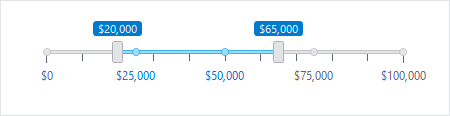
The new RangeSlider control provided a convenient way for users to select a range between two values.

Decimal Editors and Input Filtering

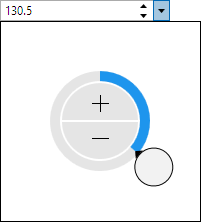
New DecimalEditBox and DecimalPicker controls provided native editing and selection for Decimal values, including integration support for DataGrid and Grids.

Most edit boxes also gained optional input filtering, while numeric editors added composite string format support for greater control over displayed values.

SyntaxEditor

Line Terminator Preservation

SyntaxEditor documents and snapshots retained the actual line terminators used by source text instead of normalizing them internally to LF. Text retrieval preserved those original line terminators by default, while new APIs made it easy to identify the inferred line terminator, determine whether line endings were uniform, or normalize a document when needed.

Performance and Editing Improvements

The internal document text storage mechanism was refactored to improve performance and reduce memory usage. Regular expression searches gained support for non-capturing groups, invalid patterns were clearly identified in the search overlay, and several core editing structures and APIs were refined.

Menu Customization and Bars

New MenuFactory and BarsMenuFactory APIs allowed applications to customize or replace contextual menus across Actipro products, including using Bars controls for a consistent menu experience. Popup-based Bars controls and their MVVM view models added PopupClosedCommand support, while standalone toolbars gained a spacer mode that made it easy to right-align items. High contrast rendering, QAT behavior, and several menu and toolbar interactions were also improved.

Docking/MDI

New methods and configurable key gestures made it easier to open tab, context, and tool window menus or customize their keyboard behavior. Mixed-DPI popup positioning, sizing, and scaling were improved, WindowControl resizing became more flexible, and the Escape key correctly canceled hosted floating-window drag operations.

Window Chrome and Themes

WindowChrome internals were simplified to use native window borders, eliminating jitter that could occur when resizing from the left or top edge. List controls also adopted a lower-contrast selected-item background so a wider range of foreground content remained clear and readable.

Modern Platform Support

All libraries added .NET 10 targets and official Visual Studio 2026 support.

Nullable reference type annotations were added throughout the libraries and samples, providing better compile-time feedback when Actipro controls were used in modern C# applications.

Core Assembly

The new Core assembly centralized fundamental classes used throughout the product suite, including observable object, disposable object, logging, weak event, and extension infrastructure. Applications using direct assembly references needed to add the Core assembly when upgrading.

Additional Improvements

Elsewhere, Shell controls gained automatic DPI image refreshes, the SyntaxEditor .NET Languages Add-on improved IntelliPrompt within top-level statements, and Shared added useful logical and visual tree extensions, new InfoBar and Card options, and a simpler licensing dialog. Because this major release introduced a new assembly and other API changes, customers should review the Converting to v26.1 documentation topic before upgrading.

Due to the new Core assembly being added and other API updates in this major release, please see the Converting to v26.1 documentation topic for upgrade details.

WinForms Controls v26.1.0 Released

by Avatar Bill Henning (Actipro)
Friday, September 4, 2026 at 7:49pm

Actipro WinForms Controls v26.1 modernizes the entire product suite with official Visual Studio 2026 and .NET 10 support, comprehensive nullable reference type annotations, and a new shared Core assembly. SyntaxEditor receives significant document model enhancements that preserve original line terminators while improving text storage performance and memory usage. The release also adds flexible context menu customization, faster Bars infrastructure, and numerous designer, DPI, and usability refinements.

See the related announcement post for the detailed list of enhancements and updates.

Download Buy Now

Here’s a look at some of the new features.

SyntaxEditor

Line Terminator Preservation

SyntaxEditor documents and snapshots now retain the actual line terminators used by source text instead of normalizing them internally to LF. Text retrieval preserves those original line terminators by default, while new APIs make it easy to identify the inferred line terminator, determine whether line endings are uniform, or normalize a document when needed.

Performance and Editing Improvements

The internal document text storage mechanism has been refactored to improve performance and reduce memory usage. Regular expression searches now support non-capturing groups, invalid patterns are clearly identified in the search overlay, and editor context menus better match the active color scheme.

Menu Customization and Bars

New MenuFactory and BarsMenuFactory APIs allow applications to customize or replace contextual menus across Actipro products, including using Bars controls for a consistent menu experience. Bars backend logic now uses generic collections to reduce boxing overhead, and several command APIs and behaviors have also been refined.

Modern Platform Support

All libraries now include .NET 10 targets and official Visual Studio 2026 support.

Nullable reference type annotations have been added throughout the libraries and samples, providing better compile-time feedback when Actipro controls are used in modern C# applications.

Additional Improvements

The release also improves Docking layout restoration in mixed-DPI environments, fixes important Wizard behavior in both modern and legacy Visual Studio designers, enhances IntelliPrompt within C# top-level statements, and adds convenient NavigationBar methods for changing the number of visible buttons.

Due to the new Core assembly being added and other API updates in this major release, please see the Converting to v26.1 documentation topic for upgrade details.

Avalonia Controls v26.1.1 Released

by Avatar Bill Henning (Actipro)
Monday, June 1, 2026 at 8:26pm

Actipro Avalonia Controls v26.1.1 is now available with a number of quality-of-life improvements.

See the related announcement post for the detailed list of enhancements and updates.

Download Buy Now

Avalonia Controls v26.1.0 Released

by Avatar Bill Henning (Actipro)
Wednesday, May 6, 2026 at 6:57pm

Actipro Avalonia Controls v26.1 is here, and it is one of our biggest updates yet. The headline is the new Data Visualization product, which introduces a comprehensive barcode generation feature set for modern Avalonia apps, from branded QR experiences to production-ready linear codes used in retail, logistics, and packaging. Alongside that major addition, v26.1 also delivers meaningful enhancements across Bars, Docking/MDI, Fundamentals, Themes, and Shared, making the entire suite more capable, polished, and ready for real-world application workflows. Other key updates include Avalonia v12 compatibility and .NET 8 and .NET 10 support.

See the related announcement post for the detailed list of enhancements and updates.

Download Buy Now

Here’s a look at some of the new features.

Data Visualization

Barcodes

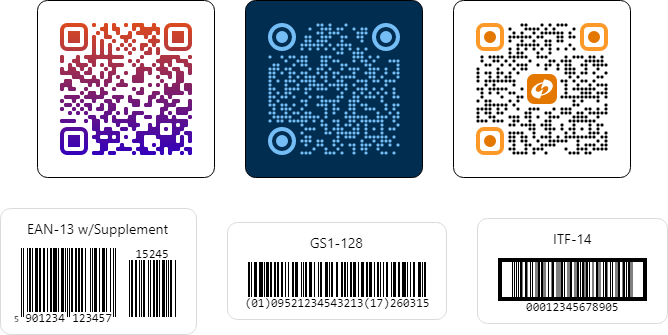
Data Visualization brings a complete barcode toolbox with 15 built-in symbologies, including QR Code, Micro QR Code, Code 128, GS1-128, EAN-13, EAN-8, UPC-A, UPC-E, Interleaved 2 of 5, ITF-14, Code 39, Code 39 Extended, Code 93, Code 93 Extended, and Codabar. This breadth lets teams standardize on a single API surface while covering the broad set of barcode formats commonly needed across consumer, business, and industrial scenarios. It is designed to be both developer-friendly and flexible enough for demanding production use.

An amazing array of barcodes can be created with this library

For teams focused on branding, v26.1 adds advanced QR Code and Micro QR Code appearance options such as module shape customization, finder pattern shape customization, primary and secondary accent brushes, and gradient brush support. These features let you produce visually distinctive codes while still preserving reliable scanning behavior. It is a strong balance between brand expression and practical usability.

Data integrity and scan reliability were also core goals. The release includes robust encoding and validation behavior across symbologies, including automatic check-digit calculation and verification where applicable, optional EAN and UPC supplements, configurable quiet zones, and error-correction controls for QR variants. For linear barcode scenarios, you can fine-tune bar height, minimum height-to-width ratio, bearer bars for supported formats, and value alignment modes to better match printing and scanning requirements.

Outside of Data Visualization, v26.1 continues the momentum from recent previews with valuable suite-wide updates.

Fundamentals

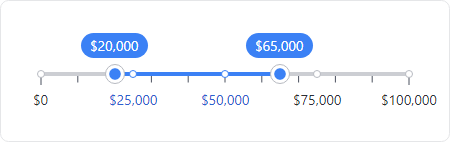
An example usage of a range slider

The new RangeSlider control elevates the Fundamentals suite with a sleek, modern way to select and fine‑tune numeric ranges.

Bars

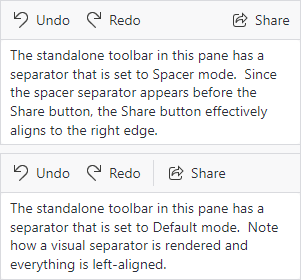
We've added a StandaloneToolBarSeparatorMode setting to BarSeparator that allows separators to act as spacers, making it easy to introduce flexible gaps or right-align items in standalone toolbars.

A comparison of a spacer separator and a default separator

With a single spacer separator, items after the spacer will be right-aligned. When using two spacer separators, three groups of items will be created:  left-aligned, center-aligned, and right-aligned. Use spacer separators to creatively position groups of items.

Themes

Dark Theme Appearance Customization

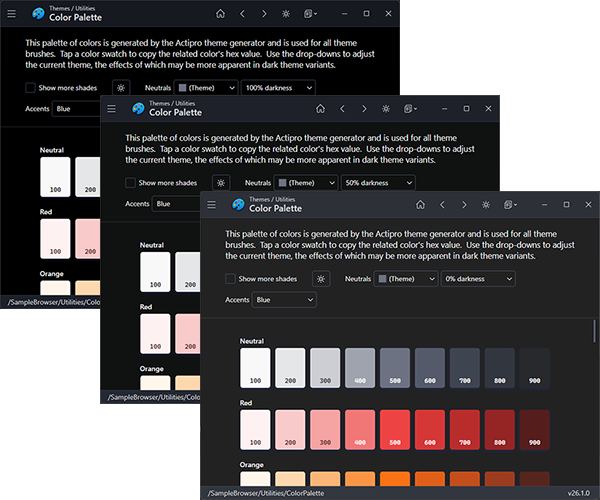
Configure dark theme tones with one simple setting

A new customization option now lets you dial in the darkness of the neutral color ramp in generated themes, making it easy to shape your dark theme anywhere from refined dark gray to rich, immersive black.

AvaloniaUI OÜ's Avalonia Pro Support

For Actipro Avalonia Pro customers, we’ve introduced support for overriding AvaloniaUI OÜ's Avalonia Pro theme resources, allowing their Markdown, TreeDataGrid, and VirtualKeyboard controls to visually blend seamlessly with Actipro themes.

Avalonia and .NET Updates

This release advances platform support by aligning dependencies with the recently-released Avalonia v12, with all control themes updated to support v12's new controls and features.

Our command bar theme in a dark theme variant

The NuGet package targets now include both .NET 8 and .NET 10. The result is a stronger foundation for teams planning new development as well as those modernizing existing applications.

Actipro Avalonia Controls v26.1 is built to help you deliver more capable interfaces, better user experiences, and faster implementation across your Avalonia projects.

Avalonia Controls v26.1.0-rc.1 Released

by Avatar Bill Henning (Actipro)
Wednesday, April 8, 2026 at 5:30pm

We're pleased to announce the availability of Actipro Avalonia Controls v26.1.0‑rc.1, a prerelease build that delivers full compatibility with the newly launched Avalonia v12.

Overview

Avalonia v12 introduces substantial updates across styling, native control behavior, and platform architecture, and this release ensures that Actipro's control suite integrates smoothly with those changes. Developers adopting Avalonia v12 can now take advantage of our updated themes, revised resource structures, and improved alignment with the platform's new conventions.

An example usage of a range slider

This build also includes several standout enhancements across our product line. The new RangeSlider control expands the Fundamentals offering with a flexible, modern slider for selecting numeric ranges.

Our command bar theme in a dark theme variant

Our theme system got a big update, with refreshed native control themes for Avalonia v12 and new themes for the latest v12 controls like the command bar, pages, pips pager, and more.

You determine how dark your dark theme tones should be with one simple setting

A new option was added for adjusting the darkness of the neutral color ramp, making it easier to fine‑tune dark theme aesthetics.  Make your dark theme appearance anywhere from a dark gray to very black.

For Actipro Avalonia Pro customers, we've added the ability to override AvaloniaUI OÜ's Avalonia Pro theme resources so those third‑party controls (Markdown, TreeDataGrid, VirtualKeyboard) can visually blend with Actipro themes.

We've also raised the minimum Avalonia dependency to v12.0.0 and added a .NET 10 target to all NuGet packages.

There are other updates in this build to discuss later, and even more coming before final v26.1 release.

Updating to the v26.1 RC1 Build

Since this is a prerelease build, here are the steps to move to it:

1) Update your project to Avalonia v12.

2) Update your Actipro Avalonia Controls NuGet package references to the "26.1.0-rc.1" prerelease version.

3) We have updated our "develop" branch in our public Actipro/Avalona-Controls GitHub repo with samples and documentation for v26.1 and Avalonia v12 compatibility. The "develop" branch may get additional updates as we make adjustments prior to a final release. Review the v26.1 breaking change notes in the documentation.

4) For customers with active subscriptions, since this is prerelease, our web site does not issue v26.1 license keys just yet. You can use the steps in the license popup to add code to temporarily hide the license popup until the final v26.1 release.

Summary

We're excited to support Avalonia v12 immediately after its release, and look forward to hearing how the new platform and our updated controls improve your development experience.