 Bill Henning (Actipro)
A new Avalonia Controls release is now available. This new version makes improvements across the entire product line. One particularly nice new feature is the ability to now use SVG images with our ImageProvider infrastructure and DynamicImage control.
See the related announcement post for the detailed list of enhancements and updates.
Here’s a look at some of the new features.
SVG Vector Image Adaptation Support
SVG images are not natively supported in Avalonia but can be used in Avalonia via a third-party "Svg.Controls.Skia.Avalonia" NuGet package. Since SVG images are external to Avalonia itself, the default implementation of our ImageProvider does not support their adaptation.
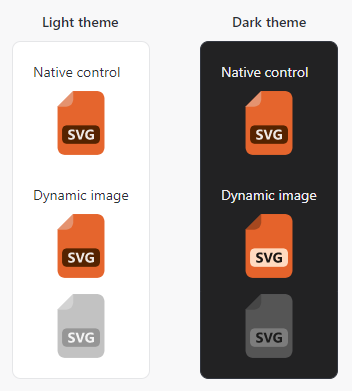
For this version, we have enhanced our ImageProvider API to support extensibility for unknown image types and created an open source implementation in our sample project's "Shared Library / Dynamic Image" sample that works with SVG images. It can easily be copied to your own apps, allowing you to use SVG images in Actipro controls and themes with full adaptation support for things like adapting for dark themes, appearing in grayscale when in a disabled control, and much more.