WinForms Controls v26.1.0 Released

by Avatar Bill Henning (Actipro)
Friday, September 4, 2026 at 7:49pm

Actipro WinForms Controls v26.1 modernizes the entire product suite with official Visual Studio 2026 and .NET 10 support, comprehensive nullable reference type annotations, and a new shared Core assembly. SyntaxEditor receives significant document model enhancements that preserve original line terminators while improving text storage performance and memory usage. The release also adds flexible context menu customization, faster Bars infrastructure, and numerous designer, DPI, and usability refinements.

See the related announcement post for the detailed list of enhancements and updates.

Download Buy Now

Here’s a look at some of the new features.

SyntaxEditor

Line Terminator Preservation

SyntaxEditor documents and snapshots now retain the actual line terminators used by source text instead of normalizing them internally to LF. Text retrieval preserves those original line terminators by default, while new APIs make it easy to identify the inferred line terminator, determine whether line endings are uniform, or normalize a document when needed.

Performance and Editing Improvements

The internal document text storage mechanism has been refactored to improve performance and reduce memory usage. Regular expression searches now support non-capturing groups, invalid patterns are clearly identified in the search overlay, and editor context menus better match the active color scheme.

Menu Customization and Bars

New MenuFactory and BarsMenuFactory APIs allow applications to customize or replace contextual menus across Actipro products, including using Bars controls for a consistent menu experience. Bars backend logic now uses generic collections to reduce boxing overhead, and several command APIs and behaviors have also been refined.

Modern Platform Support

All libraries now include .NET 10 targets and official Visual Studio 2026 support.

Nullable reference type annotations have been added throughout the libraries and samples, providing better compile-time feedback when Actipro controls are used in modern C# applications.

Additional Improvements

The release also improves Docking layout restoration in mixed-DPI environments, fixes important Wizard behavior in both modern and legacy Visual Studio designers, enhances IntelliPrompt within C# top-level statements, and adds convenient NavigationBar methods for changing the number of visible buttons.

Due to the new Core assembly being added and other API updates in this major release, please see the Converting to v26.1 documentation topic for upgrade details.
WinForms Controls v25.1.2 Released

by Avatar Bill Henning (Actipro)
Friday, March 13, 2026 at 7:37pm

This version implements a huge update in the SyntaxEditor Python Languages Add-on to support Python 3.11 syntax and makes other improvements to the Python and .NET Languages Add-ons.

See the related announcement post for the detailed list of enhancements and updates.

Download Buy Now

WinForms Controls v25.1.1 Released

by Avatar Bill Henning (Actipro)
Thursday, January 22, 2026 at 9:57pm

This version implements a huge update in the SyntaxEditor Python Languages Add-on to support Python 3.11 syntax and makes other improvements to the Python and .NET Languages Add-ons.

See the related announcement post for the detailed list of enhancements and updates.

Download Buy Now

Here’s a look at some of the new features.

SyntaxEditor Python Language Add-on

Python v3.11 Syntax Support

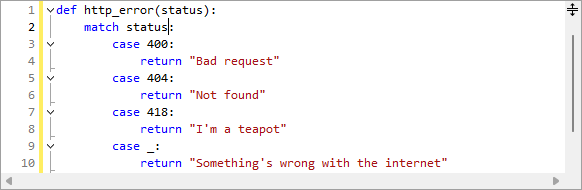
Pattern matching example

The Python Language Add-on's parser previously only supported Python v3.9 syntax, which will be end of life later this year. The updates in this version added all the syntax updates in v3.10 (like pattern matching) and v3.11. More updates are planned to further increase the supported Python version.

Source Location Display

Past versions have always displayed the source module path on IntelliPrompt popups. In some cases, customers didn't wish for this information to be available to end users. A new option can prevent its display.

Field and Variable Docstrings

Docstrings for fields and variables will now be displayed in IntelliPrompt popups.

WinForms Controls v25.1.0 Released

by Avatar Bill Henning (Actipro)
Tuesday, June 10, 2025 at 6:52pm

This version adds new SyntaxEditor features, implements a huge update in the .NET Languages Add-on to support the latest C# 13 syntax, makes large improvements in C# interpolated string editing, and much more.

See the related announcement post for the detailed list of enhancements and updates.

Download Buy Now

Here’s a look at some of the new features.

SyntaxEditor

Intra-Text Adornment Location

Elapsed time adornment shown at the end of a line

Intra-text adornments can now optionally appear after the tagged text range instead of before. This allows for features such as AI suggestions or contextual information to appear past the last character in a line.

Outlining Margin Modernization

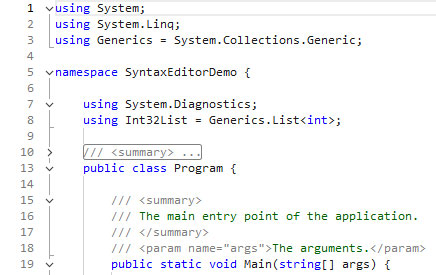
Outlining margin glyph updates

The rendering of the outlining margin has been modernized and now matches the latest Visual Studio code editor appearance.

SyntaxEditor .NET Languages Add-on

C# 13 Syntax Support

Parameters showing in IntelliPrompt from C# primary constructors

The .NET Languages Add-on’s C# parser previously only supported C# 9 syntax. The updates in this version now support all C# features up to and including C# 13.

C# Interpolated String Expressions

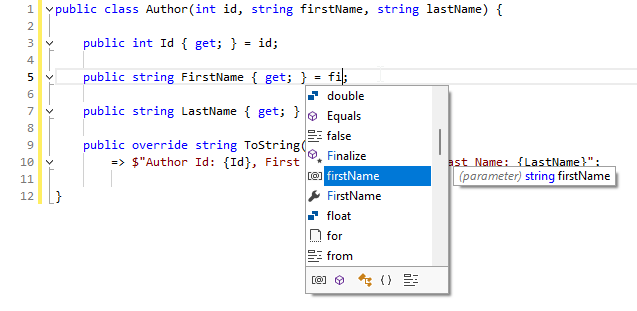
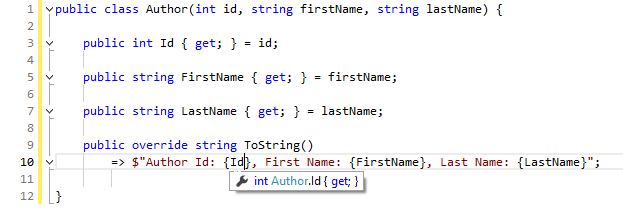
IntelliPrompt working in interpolated string expressions

The .NET Languages Add-on’s C# syntax language now syntax highlights interpolated string expressions. It also fully supports IntelliPrompt features within the expressions, making interpolated string editing much better.

Miscellaneous

.NET Requirements

All assemblies now have a target for .NET 8. Prior .NET Core 3.1 targets were updated to .NET 6 instead, which can be used by those not yet moving to .NET 8.

WinForms Controls v24.1.1 Maintenance Release

by Avatar Bill Henning (Actipro)
Tuesday, September 10, 2024 at 1:58pm

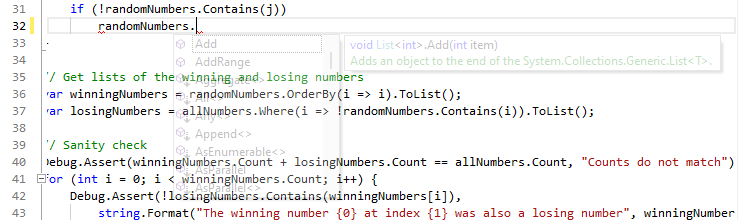
This version makes numerous minor updates across the WinForms control product line, including the ability for holding Ctrl key to make SyntaxEditor IntelliPrompt popups semi-transparent.

The Ctrl key is held down, making the SyntaxEditor completion list semi-transparent

See the related announcement post for the detailed list of enhancements and updates.

Download Buy Now